New on MBClaude: KV-cache calculator, replayable terminal recordings, Python live in the browser and fact sheets
MBClaude has four new reader features: a KV-cache calculator with sourced model presets, terminal recordings you can replay and copy step by step, a Python prompt that runs in your browser (standard library and numpy), and fact sheets that label every benchmark as self-reported, independent or reproduced. We explain how each works and its limits.
In short
MBClaude has four new reader features. A KV-cache calculator compares how much memory different attention designs need. Articles can now include a terminal recording that you can replay step by step, and a Python live panel that runs short examples in your own browser. Model and product articles get a fact sheet that separates a vendor's own benchmark claims from independent measurements. All four follow the same rule as the articles: nothing appears on the site before a human editor has approved it.
How it works
KV-cache calculator (Tools › KV-cache). While a language model generates text, it keeps the keys and values of all earlier tokens in memory. You choose a model preset or enter your own numbers, a context length, a batch size and a precision, and the calculator shows the cache size and the longest context that fits a given amount of GPU memory. Every preset links to the configuration file that its numbers come from.
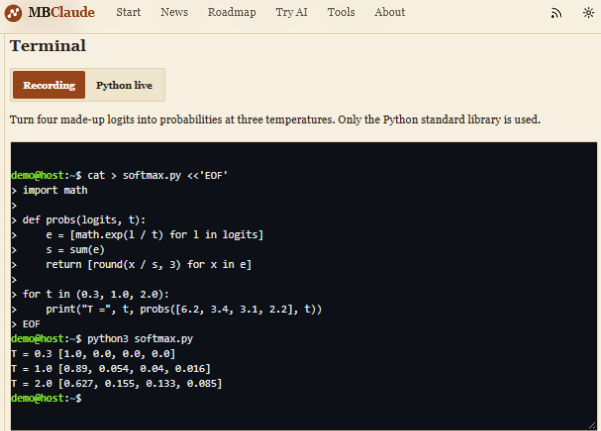
Terminal recordings. Under "Try it yourself", an article can show a recording of a real terminal session. You can play, pause, seek and change the speed, jump between steps, and copy each command to run it on your own machine. The site itself never runs these commands. The first example is in our article on temperature in sampling.
Python live. Next to the recording (or on its own), you get a real Python 3 prompt. It runs in your browser in an isolated sandbox (Pyodide), not on our server. The runtime, about 6 MB, is only downloaded after you click "Start Python". Each prepared example has a Run and a Copy button, and you can also type your own code.
Fact sheets. A box under the summary lists model, vendor, size, context length, release date and licence. Every benchmark number carries its origin: self-reported (the vendor's claim), independent (measured by a third party) or reproduced (re-run by us), with a link. Analogy: like the nutrition label on food, the same fields in the same place, so you can compare products quickly and see who measured what.
Under the hood
Calculator formula. For standard attention (MHA, GQA, MQA), each full-attention layer stores 2 × kv_heads × head_dim numbers per token. Multi-head latent attention (MLA) stores latent + rope numbers per token. Sliding-window layers keep at most window tokens, and linear-attention or state-space layers keep a fixed-size state:
cache = batch × (full_layers × tokens × per_token
                 + window_layers × min(tokens, window) × per_token
                 + linear_layers × state) × bytes_per_number
It ignores model weights, activations, framework overhead, paged-attention block rounding and prefix sharing, so treat the result as a planning estimate. Seven presets are published so far, one or more for each attention type: OPT-6.7B (MHA), Falcon-7B (MQA), Mistral-7B v0.1, Qwen2.5-7B, gpt-oss-20B and Qwen3-Next-80B-A3B (GQA, partly with sliding-window or linear layers) and DeepSeek-V3 (MLA).
Licence classes in fact sheets. We classify by what the licence text allows, not by the vendor's wording:
| Class | Meaning |
|---|---|
| open-permissive | Weights downloadable under a permissive licence (for example Apache-2.0, MIT) |
| open-restricted | Weights downloadable, but a custom licence limits use |
| research-only | Weights for non-commercial or research use only |
| proprietary | No weights; API or app access only |
| unknown | We could not find or read the licence |
For the first three classes the fact sheet must link to the licence text. We use the term "open weights" rather than "open source" unless a licence meets an open-source definition.
Limits of Python live. Only the Python standard library and numpy are available. There is no network access, no input(), and files do not persist. Examples that need other packages are shown as terminal recordings instead.
Safety rules for recordings. Recordings are made on throw-away containers or virtual machines without secrets, contain only commands that really ran (output is never edited by hand), pin package versions where it matters, and avoid patterns such as piping a download straight into a shell. The server removes terminal title, hyperlink and clipboard escape sequences from recordings.
Try it yourself
Open the KV-cache calculator, pick the DeepSeek-V3 preset and move the context slider: the cache grows linearly. Then pick Mistral-7B v0.1: it stops growing at 4,096 tokens, because all its layers use a sliding window.
The Python live panel of this article contains the same formula, so you can check the calculator's numbers or change them. We ran it with Python 3 and the standard library only (BF16, batch 1):
--- 4096 tokens, batch 1, BF16
Mistral-7B v0.1         0.50 GiB
DeepSeek-V3             0.27 GiB
Qwen3-Next-80B-A3B      0.13 GiB
--- 32768 tokens, batch 1, BF16
Mistral-7B v0.1         0.50 GiB
DeepSeek-V3             2.14 GiB
Qwen3-Next-80B-A3B      0.79 GiB
Note the different shapes: Mistral-7B v0.1 is flat (sliding window), DeepSeek-V3 grows with every token but slowly (compressed latent), and Qwen3-Next-80B-A3B grows only in its 12 full-attention layers, while its 36 linear layers keep a fixed state.
Python in your browser
Play with it
Sources
What should happen next with this?
One click per article, no account needed. “Go deeper” feeds the research queue.